Part 1: The Single-Assistant Ceiling (And Why a Fleet Breaks It)
60-second video version of this part.
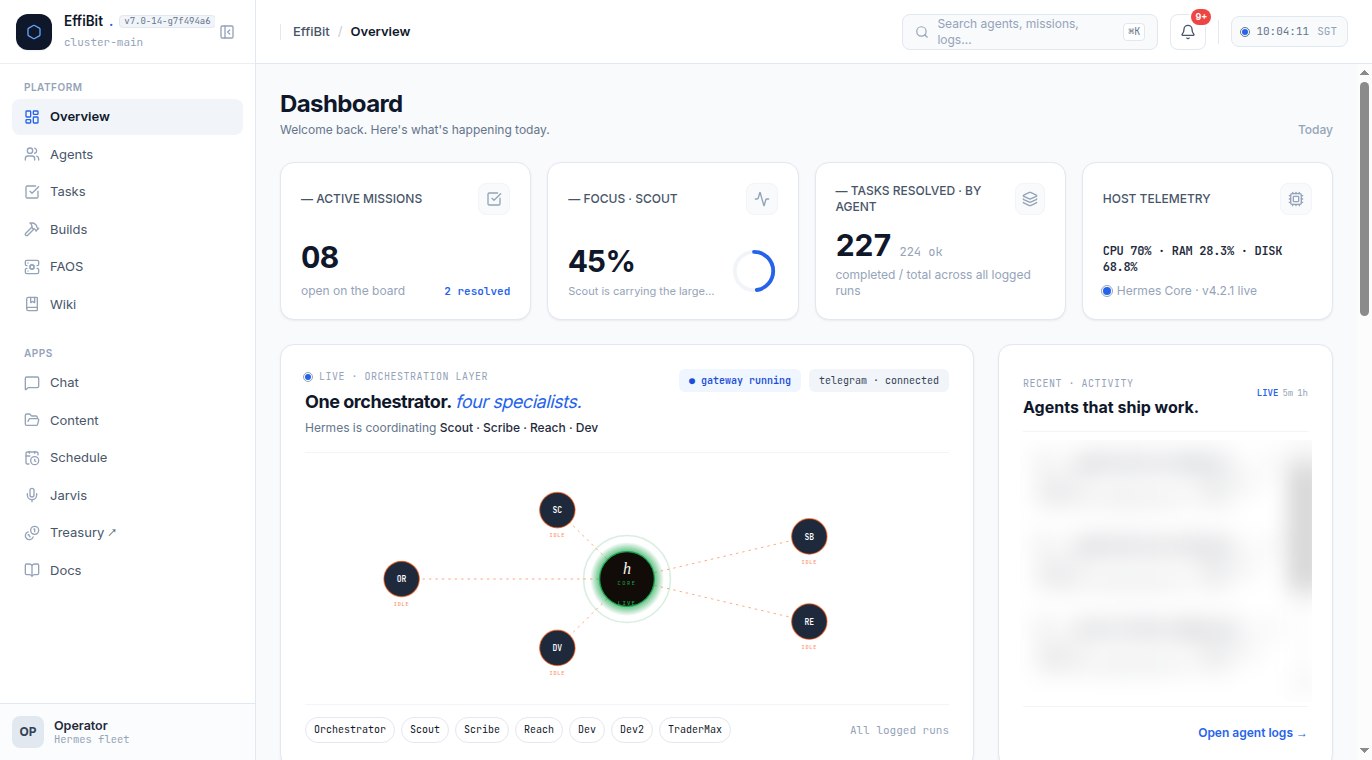
This series is a journey, not an endpoint. Effibit is not a lab running a perfect multi-agent system — we're an engineering consultancy that got tired of our own assistant forgetting things, and we walked the messy path of building a small fleet out of what we had. This is Part 1 of that walk. If you've ever felt like "my AI" keeps losing context, you already know the pain I'm about to describe.
The single-assistant problem
Start with the obvious: you talk to one assistant every day. It writes your drafts, answers your questions, helps you code. It feels smart. Then you open a new chat and it greets you like a stranger — as if the last three weeks never happened. It is not being difficult. It does not remember, because by default a fresh session begins as a blank slate.
The cost is not inconvenience. It is repeated work, silently. You re-explain your business context, your constraints, your voice, your "don't do X" rules — over and over, to a machine that should already know. Every re-explanation is a small tax you pay on top of every real task.
There is a second cost that is easier to miss: a single assistant can only do one thing at a time. When you ask it to research a topic, it cannot simultaneously draft the follow-up post, check the numbers, and keep an eye on a monitoring task. It has one context, one thread, one train of thought. Anything that needs more than one flow either queues behind it or gets squeezed into one crowded conversation.
What I actually want instead
Three things, in order of importance:
- Persistence — an assistant that keeps what matters across sessions, so I stop re-teaching it the basics every morning.
- Specialisation — a researcher that lives in research, a writer that lives in writing, a growth person that obsesses over distribution, an engineer that lives in the code. Each with its own tools, its own memory, its own focus.
- Parallelism — all of them working different parts of the same mission at the same time, coordinated by someone who sees the whole picture.
That's the "agent fleet" thesis. Instead of one generalist that forgets and serialises, run several specialists that persist and parallelise — with an orchestrator that keeps them honest and on-mission.
The honest framing: it is a journey, not a product
I want to be upfront about what this series is not. It is not a "install this, ship a fleet by Friday" tutorial. It is the actual sequence we followed, warts included. Part 7 is a real bug about an orchestrator that went invisible because it didn't log its own work. We make mistakes in this series on purpose, because mistakes are where the real lessons live.
What you'll carry out of the whole series is a repeatable shape: one orchestrator profile, specialist profiles with their own model/skills/memory, a shared memory layer so they stop forgetting, and a visibility layer so you can see what they're actually doing.
The prompt-based path
Everything in this series has a CLI/config path and a prompt path — you can do the setup work yourself with commands, or hand the decision to an AI coding assistant and have it run the commands for you. Part 1 has no setup to do yet (it's the "why"), but here's the prompt that sets the tone for the whole series, one you could literally paste to Claude Code or to Hermes itself before you touch any config:
I want to stop using one AI assistant that forgets everything between sessions
and build a small "agent fleet" instead: one orchestrator plus a few
specialists (research, writing, growth, engineering), each with its own
memory and model, coordinated so they can work in parallel. Walk me through
setting this up step by step, starting with the orchestrator profile. Use
real CLI commands, don't invent config keys, and ask me before changing
anything.
Why this prompt gets you the right outcome: it states the three things we actually want — persistence, specialisation, parallelism — without you having to know a single Hermes flag. A competent coding assistant reading "don't invent config keys" and "ask me before changing anything" will do exactly what Part 3 recommends by hand: create one profile, inspect the real config, and stop there before building specialists. The prompt front-loads your intent; the assistant back-fills the mechanism. Both paths land on the same structure — this one just lets the assistant type the commands.
The punchline for Part 1
You do not need a bigger, better single assistant. You need a system — a small set of focused agents that remember, specialise, and work in parallel under one orchestrator. The problem is real, it is on your desk right now, and it is solvable with tools you already have — whether you type the commands yourself or hand the plan to an assistant and watch it type them. Over the next six parts we build it, one layer at a time, and we show you the mistakes so you don't repeat them.
Next: what "losing context" really means under the hood — the blank slate every session problem, and why memory is the first thing you should care about.